Digital Marketing Agency
WPS Office Review 2026: Features, Pricing, and Performance Guide
Discover the complete WPS Office Review 2026, including its latest features, pricing plans, AI tools, PDF editor, and performance comparison with Microsoft Office. Learn whether WPS Office is the best affordable productivity suite for students, freelancers, and businesses in 2026.
Table of Contents
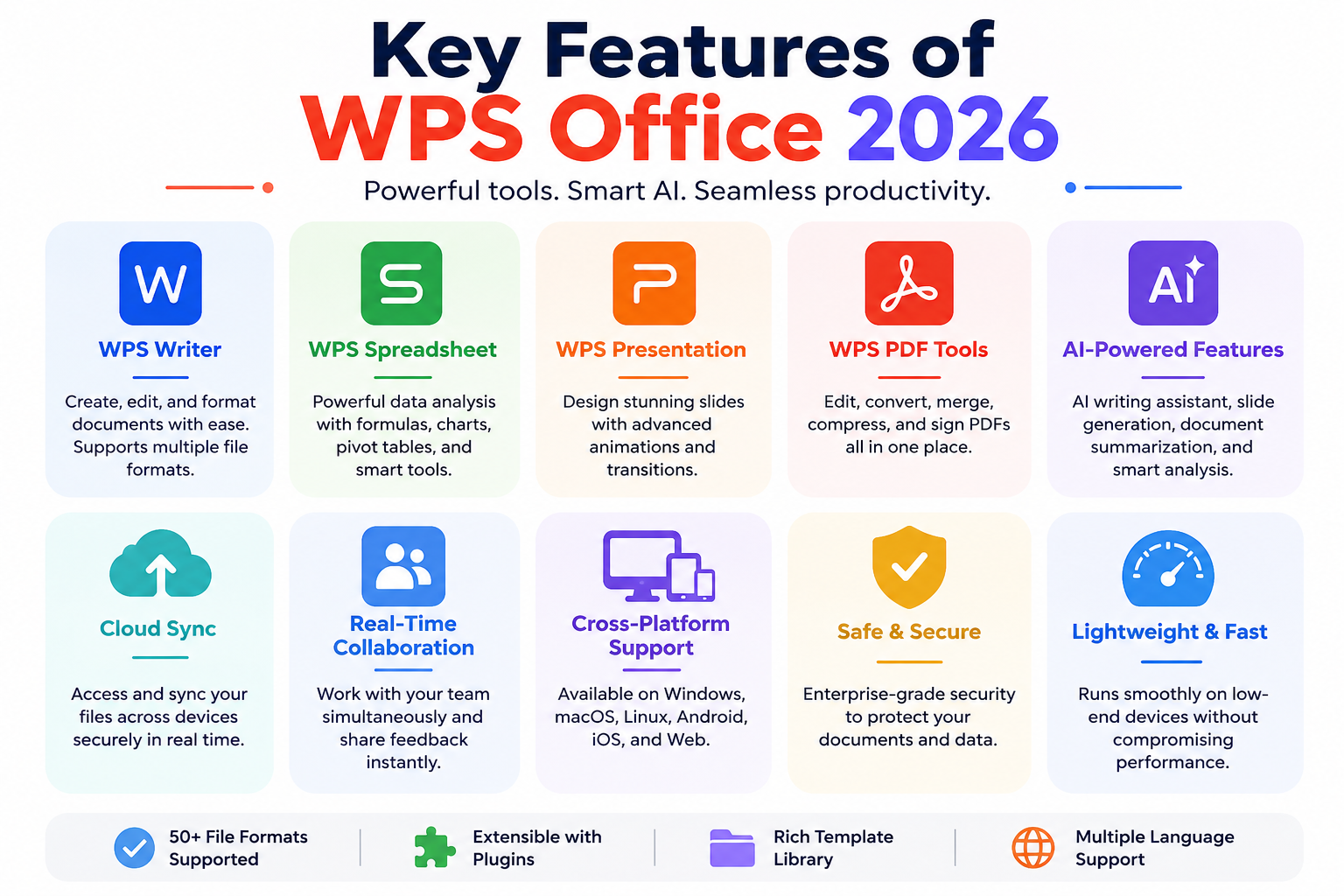
ToggleThe productivity software market has become more competitive than ever in 2026, and WPS Office has managed to stand out as one of the most downloaded office suites in the world. Developed by Kingsoft, WPS Office offers an all-in-one platform for documents, spreadsheets, presentations, and PDF management. It is available on Windows, macOS, Linux, Android, iOS, and web browsers, making it one of the most flexible office productivity solutions available today. According to the official website, the software now supports over 47 file formats and integrates AI-powered productivity tools directly into the workspace.
One of the biggest reasons behind the rapid growth of WPS Office is its balance between affordability and functionality. While many office suites require expensive subscriptions, WPS Office still offers a capable free version with core editing tools. This has made it extremely popular among students, freelancers, startups, and even small businesses trying to reduce software costs. Think of it like a compact Swiss Army knife for productivity — lightweight, versatile, and packed with features that usually require multiple apps elsewhere.
The 2026 version pushes heavily into AI integration. The company now markets the suite as an “AI-native office platform,” offering document summarization, AI-generated slides, spreadsheet analysis, OCR scanning, and smart formatting. Instead of switching between separate AI apps and office tools, users can perform everything inside a single interface. That convenience has become a major selling point in a world where time-saving automation matters more than ever.
Another impressive aspect is the software’s lightweight nature. Unlike some heavier office suites that consume large amounts of RAM and storage, WPS Office remains optimized for low-end laptops and older systems. This makes it especially attractive in developing markets and educational environments where expensive hardware is not always available. For many users, it feels like getting premium productivity without premium hardware requirements.
WPS Office originally started as a word-processing program decades ago before evolving into a full office ecosystem. Over time, it expanded into spreadsheets, presentations, PDF tools, and cloud collaboration features. In recent years, the software shifted aggressively toward AI productivity, recognizing how automation would shape modern work environments.
The growth of remote work also accelerated WPS Office adoption. As more teams required cloud synchronization and mobile editing, WPS invested heavily in cross-platform compatibility and online collaboration tools. This helped the software compete against giants like Microsoft and Google.
Several factors explain the software’s global popularity:
Feature | Benefit |
Free Version | Accessible for students and casual users |
Lightweight Design | Works smoothly on budget devices |
AI Features | Saves time during document creation |
PDF Integration | Reduces need for separate PDF software |
Multi-Platform Support | Works across desktop and mobile |
These advantages have transformed WPS Office into more than just an alternative to Microsoft Office. For many users, it has become the primary productivity platform.
The strongest selling point of WPS Office in 2026 is undoubtedly its feature set. Unlike traditional office suites that separate productivity tools into different products, WPS combines everything into one compact ecosystem. Writer, Spreadsheet, Presentation, PDF editing, OCR scanning, AI assistance, and cloud synchronization all work under one roof. That unified experience makes workflow smoother and less distracting.
The AI functionality is the headline feature this year. WPS AI can summarize long documents, generate outlines, rewrite content, translate text side-by-side, and create professional presentations from prompts. According to the company’s official platform, users can now generate polished slides automatically and perform spreadsheet analysis using conversational AI commands.
Another standout feature is PDF management. Many office suites force users to purchase additional PDF software, but WPS integrates editing, conversion, compression, OCR, and e-signature tools directly into the suite. For freelancers or small businesses dealing with contracts and reports daily, this can eliminate additional software subscriptions entirely.
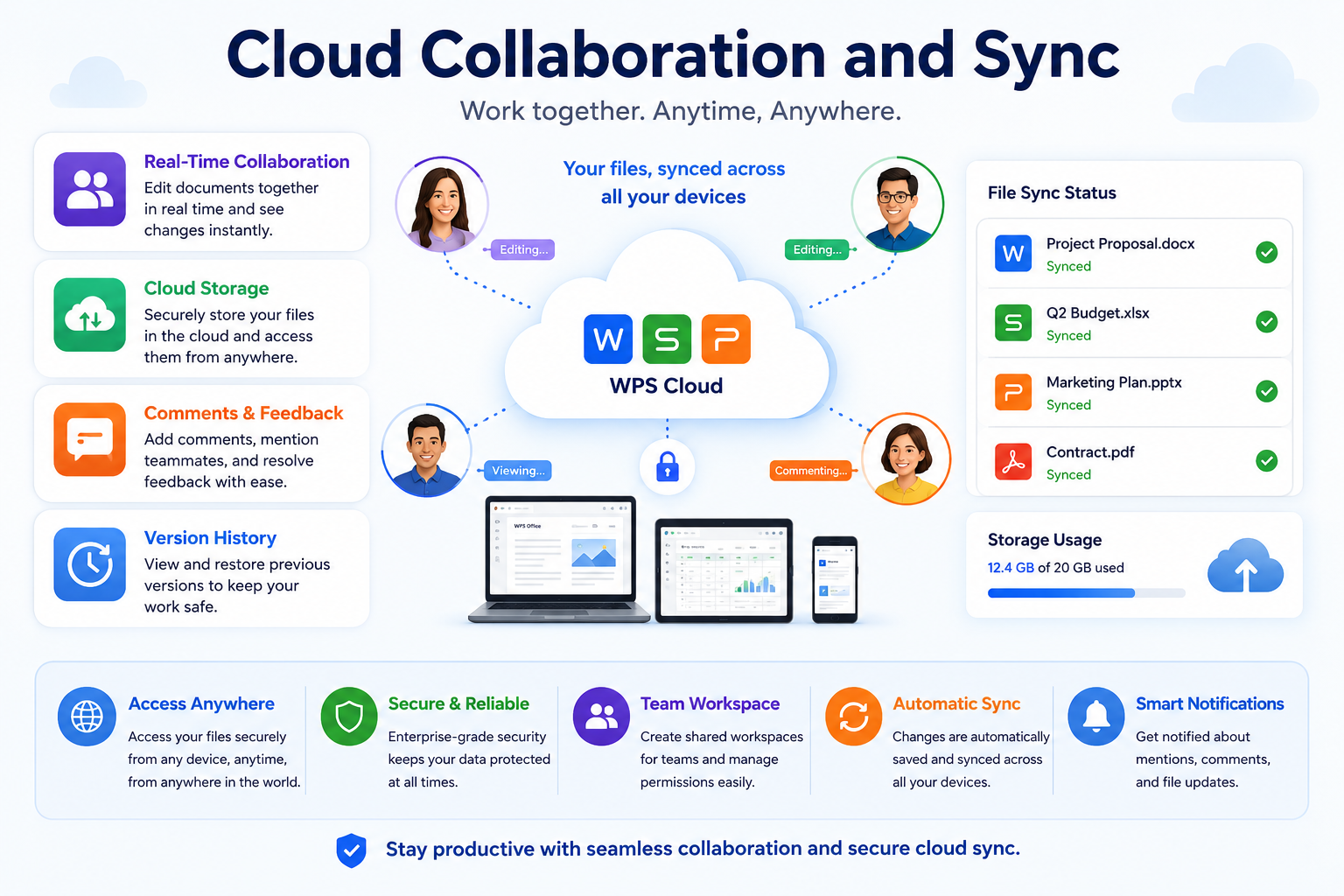
The software also focuses heavily on cloud collaboration. Real-time editing, shared workspaces, comment tracking, and synchronized document access across devices allow teams to work together efficiently. It may not completely replace enterprise collaboration platforms yet, but it closes the gap significantly for small and medium-sized organizations.
WPS Writer functions similarly to Microsoft Word but includes additional lightweight optimization. It supports DOC, DOCX, TXT, and several other formats. The interface feels familiar, which helps new users adapt quickly without a steep learning curve.
The AI-powered writing assistant is one of the biggest upgrades in 2026. It can help generate reports, summarize articles, rewrite paragraphs, and improve grammar instantly. For content creators and office professionals, this dramatically reduces repetitive tasks.
WPS Spreadsheet supports advanced formulas, pivot tables, charts, and large datasets. The AI analysis tools now help interpret spreadsheet data automatically. Instead of manually creating complex formulas, users can ask AI to generate insights or summaries.
This feature is especially useful for beginners who struggle with spreadsheet complexity. It feels like having a personal Excel tutor built directly into the software.
Creating presentations manually can feel exhausting, especially under deadlines. WPS Presentation uses AI to generate slide designs, layouts, and formatting automatically. Users simply provide prompts or content outlines, and the system builds presentation structures instantly.
That feature alone can save hours of formatting work for students and professionals alike.
The built-in PDF suite includes:
This integrated approach is one of WPS Office’s biggest competitive advantages in 2026.

User experience can make or break productivity software, and WPS Office performs surprisingly well in this department. The interface feels modern, colorful, and approachable without becoming overwhelming. Users familiar with Microsoft Office will immediately recognize the ribbon-style toolbar, document navigation system, and editing layout.
One feature many users love is the multi-tab workspace. Instead of opening separate windows for each document, WPS Office allows multiple files to appear in tabs within one interface. It works much like a web browser and dramatically improves workflow organization. If you constantly juggle spreadsheets, PDFs, and documents simultaneously, this feature feels incredibly natural.
The software also loads quickly compared to heavier office suites. On older laptops, WPS Office feels noticeably lighter and faster than some premium competitors. This performance advantage matters greatly for students and professionals using budget devices. A lightweight office suite can mean the difference between smooth multitasking and constant lag.
Mobile usability is another strong point. The Android and iOS apps maintain surprisingly strong feature parity with the desktop version. Users can edit presentations, annotate PDFs, and synchronize cloud documents seamlessly. That consistency across devices creates a more unified productivity experience.
Customization options are solid as well. Themes, layouts, toolbar settings, and cloud integrations can all be adjusted according to user preferences. While power users may still prefer the deep customization of Microsoft Office, WPS Office strikes a good balance between simplicity and flexibility.
The design philosophy behind WPS Office focuses on accessibility. Icons are large, menus are logically grouped, and frequently used tools remain easy to access. Even beginners can start editing documents without spending hours learning the interface.
The tabbed document system deserves special praise because it genuinely improves productivity. Instead of cluttering the desktop with multiple windows, everything stays organized inside one workspace.
That small design decision has a surprisingly large impact on workflow efficiency.
Performance is one of the strongest reasons users switch to WPS Office. The suite remains compact, fast, and optimized even on lower-end hardware. According to recent reviews, the installation size remains significantly smaller than many competing office suites.
File compatibility is another area where WPS Office performs impressively well. DOCX, XLSX, PPTX, and PDF files generally maintain formatting accurately when opened inside the software. That compatibility is essential because nobody wants broken layouts during professional work or academic submissions.
The software also handles large documents efficiently. While extremely massive spreadsheets may still challenge lower-end systems, average workloads run smoothly. Startup times are fast, memory usage stays relatively low, and background synchronization rarely feels intrusive.
Cloud syncing performance has improved considerably in 2026. Documents update quickly across devices, and users can resume work almost instantly. The synchronization process feels smooth enough that switching between desktop and mobile devices no longer feels disruptive.
For Linux users, WPS Office remains one of the few polished office suites with dedicated Linux support. This gives it a unique advantage among users who prefer open-source operating systems but still require Microsoft-compatible document editing.
Here’s a quick comparison of general resource usage:
Office Suite | Approximate Resource Usage | Best For |
WPS Office | Lightweight | Budget PCs |
Microsoft 365 | Heavy | Enterprise use |
Google Docs | Browser-dependent | Cloud collaboration |
LibreOffice | Medium | Offline productivity |
This lightweight optimization continues to be one of WPS Office’s biggest strengths.
Compatibility issues are surprisingly rare. Documents retain fonts, layouts, formatting, and transitions effectively. For most casual and professional users, the compatibility level is more than sufficient.
Modern productivity software cannot survive without cloud integration, and WPS Office clearly understands that reality. The 2026 version emphasizes synchronized workflows, real-time collaboration, and device continuity. Users can begin editing on a laptop, continue on a smartphone, and finish on a tablet without losing progress.
Real-time collaboration tools now include comments, cursor tracking, shared editing, and instant synchronization. These features are particularly useful for remote teams and students working on group projects. The workflow feels increasingly similar to Google Workspace while maintaining strong offline functionality.
Cloud storage integration is also improving steadily. WPS provides cloud space within subscription plans and supports external cloud services. According to official plan information, Pro users receive up to 20GB of cloud storage.
The collaboration features may not completely surpass enterprise-focused ecosystems yet, but they are highly competitive for freelancers, educators, startups, and smaller organizations. For many users, the collaboration tools available in WPS Office are already more than enough.
Shared editing helps teams work together more efficiently without emailing files repeatedly. Changes update instantly, reducing version confusion and workflow delays.
Cross-device syncing works smoothly across Windows, macOS, Android, iOS, and web browsers. This flexibility is one reason WPS Office continues expanding globally.
Pricing remains one of WPS Office’s biggest advantages. While competitors continue increasing subscription costs, WPS maintains an aggressive pricing strategy that appeals to budget-conscious users.
The free version still includes Writer, Spreadsheet, Presentation, and limited PDF tools. Basic users can comfortably manage documents without spending money. That alone makes WPS Office attractive for students and freelancers.
The premium plans unlock advanced PDF editing, AI tools, OCR scanning, cloud storage, and ad removal. According to current subscription information, WPS Pro+ costs around $69.99 annually, while AI-focused plans range higher depending on included features.
Here is a simplified pricing overview:
Plan | Price | Main Features |
WPS Standard | Free | Basic office tools |
WPS Pro+ | ~$69.99/year | PDF editing, no ads |
WPS AI | ~$9.99/month | AI productivity tools |
WPS Pro + AI | ~$129.99/year | Full feature access |
Compared to Microsoft 365 subscriptions, WPS Office remains significantly cheaper.
The free version includes:
That feature list is generous considering the software costs nothing.
The paid tiers mainly target professionals who require advanced PDF editing, AI assistance, and expanded cloud storage. Users heavily dependent on automation may find the AI plans especially valuable.
Why HubSpot Is the Best CRM for Small Businesses
Why GOVEE MOMENTS TRADING LIMITED Is Leading in RGB Innovation
Social Catfish vs BeenVerified: Which Tool is Better for Background Checks?
Lordhair Maintenance Guide: Make Your Hairpiece Last Longer
Why Sonetel Is the Smart Choice for International Calling
Every productivity suite has strengths and weaknesses, and WPS Office is no exception.
Pros | Cons |
Affordable pricing | Ads in free version |
Excellent PDF tools | Some advanced features locked |
AI integration | Occasional compatibility quirks |
Lightweight performance | Enterprise tools less advanced |
Strong mobile apps | Internet needed for AI features |
The ads in the free version remain the most common complaint among users. Upgrade prompts can occasionally interrupt workflow. Still, many users tolerate this because the free features remain highly functional.
Comparing WPS Office with Microsoft Office is inevitable because both platforms target similar audiences. Microsoft still dominates enterprise environments due to deep ecosystem integration, enterprise security, and advanced collaboration tools.
However, WPS Office competes aggressively in affordability, performance, and integrated PDF functionality. Microsoft Office often requires separate tools or subscriptions for certain PDF capabilities, while WPS bundles many of them together.
AI is another interesting battleground. WPS has rapidly integrated AI-powered productivity into multiple tools, from writing assistance to slide generation. Microsoft also offers AI through Copilot, but subscription costs can become much higher.
For casual users, students, and freelancers, WPS Office often provides better overall value. For large enterprises with complex workflows, Microsoft still holds advantages in infrastructure and advanced integrations.
Students are arguably one of the biggest beneficiaries of WPS Office. The free plan includes nearly everything needed for assignments, reports, spreadsheets, and presentations. Since the software runs efficiently on older laptops, students don’t need expensive hardware either.
Businesses also benefit from the affordable pricing structure. Small teams can access cloud collaboration, PDF tools, AI features, and multi-device support without massive licensing costs. That flexibility matters for startups trying to scale efficiently.
Educational users especially appreciate the integrated PDF tools because academic workflows often involve research papers, scanned notes, and document conversion. Instead of juggling multiple apps, everything stays centralized.
For businesses, the lightweight installation and cross-platform compatibility simplify deployment. Teams working remotely across different devices can collaborate effectively without major technical barriers.
WPS Office has evolved far beyond being “just a free Microsoft Office alternative.” In 2026, it stands as a powerful productivity ecosystem with AI integration, strong PDF tools, cloud collaboration, and lightweight performance packed into one affordable platform.
Its biggest strengths remain affordability, speed, and versatility. The software performs exceptionally well on lower-end hardware while still offering modern AI-powered features that many premium competitors charge heavily for. The integrated PDF tools alone make it appealing for freelancers, students, and businesses trying to reduce software costs.
The free version remains one of the best productivity offerings available today. Although ads and upgrade prompts can occasionally become annoying, the value proposition is difficult to ignore. Premium plans also remain reasonably priced compared to competing office ecosystems.
For users who need affordable productivity software with modern AI capabilities, WPS Office is absolutely worth considering in 2026. It may not fully replace enterprise-grade Microsoft ecosystems for every organization, but for millions of users worldwide, it already provides everything necessary for daily work and productivity.
Yes, WPS Office still offers a free plan with Writer, Spreadsheet, Presentation, and limited PDF features. Advanced tools require paid subscriptions.
Yes, WPS Office supports DOCX, XLSX, PPTX, and many other Microsoft Office formats with strong compatibility.
WPS AI includes document summarization, AI writing, slide generation, spreadsheet analysis, OCR, and translation features.
For affordability and lightweight performance, WPS Office is excellent. Microsoft Office still leads in enterprise integrations and advanced collaboration.
Yes, one of WPS Office’s biggest strengths is its lightweight optimization and low resource consumption.
times.software
Table of Contents
×