WeVideo

Why WeVideo Is a Popular Choice for Cloud Video Editing

Why WeVideo is a popular choice for cloud video editing explores how WeVideo simplifies online video creation with its user-friendly interface, powerful cloud-based features, easy collaboration tools, and flexible editing options for educators, creators, and businesses alike.

Table of Contents

Introduction to Cloud Video Editing

Video editing used to feel like a heavyweight job. You needed a powerful computer, expensive software, and a lot of patience. But times have changed. Today, cloud-based tools are flipping the script—and they’re doing it fast.

What Is Cloud-Based Video Editing?

Cloud video editing means you edit videos directly in your web browser. No downloads. No massive installations. No system crashes because your RAM gave up halfway through rendering. Everything—from editing to exporting—happens online.

Think of it like Google Docs, but for video editing. You log in, start editing, save automatically, and pick up right where you left off from any device.

Why Cloud Editing Is the Future

Let’s be honest—mobility matters. People want tools that move with them. Cloud editing offers flexibility, collaboration, and freedom from hardware limitations. That’s exactly why platforms like WeVideo are becoming go-to choices.

Overview of WeVideo

What Is WeVideo?

WeVideo is a cloud-based video editing platform designed for simplicity, speed, and collaboration. It allows users to create professional-looking videos without advanced technical skills. Whether you’re a student, teacher, marketer, or content creator, WeVideo fits right in.

It runs entirely in your browser, meaning your laptop’s age doesn’t matter as much anymore. If it can open a browser, it can edit videos.

Who Uses WeVideo the Most?

WeVideo is widely used by:

  1. Educators and students
  2. Small businesses
  3. Social media creators
  4. Marketing teams
  5. Remote collaborators

Basically, anyone who wants to create videos without the headache of traditional software.

Ease of Use and Beginner-Friendly Interface

Simple Dashboard Design

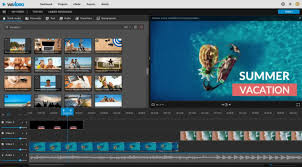
The first thing you notice about WeVideo is how clean it looks. No clutter. No intimidating panels. Everything is laid out logically, making it easy to find what you need without digging through menus.

Drag-and-Drop Editing Explained

Editing feels as easy as building with LEGO blocks. You drag clips onto the timeline, trim them, add music, throw in text, and boom—you’ve got a video. No steep learning curve. No frustration.

Work from Anywhere, Anytime

Cross-Device Compatibility

One of WeVideo’s biggest strengths is flexibility. Start editing on your office computer, continue on your home laptop, and make final tweaks on a tablet. Your project stays synced in the cloud.

No Heavy Hardware Required

Forget expensive GPUs and high-end processors. Since rendering happens in the cloud, your device doesn’t break a sweat. That’s a huge win for students and small teams.

Powerful Features Inside a Browser

Multi-Track Timeline Editing

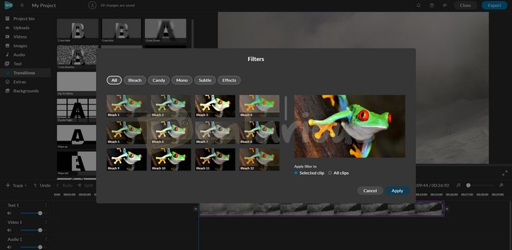
Don’t let the simplicity fool you. WeVideo supports multi-track editing, allowing you to layer video, audio, text, and effects like a pro.

Built-in Media Library

Stock Videos, Music, and Images

Need background music or a quick stock clip? WeVideo has you covered with a built-in library. It’s like having a mini production studio ready to go.

Collaboration Made Easy

Real-Time Team Collaboration

Multiple users can work on the same project. Editors, reviewers, and creators can collaborate without sending files back and forth like it’s 2010.

Ideal for Schools and Businesses

Teachers can assign projects. Teams can review drafts. Feedback becomes faster and smoother.

Education-Focused Tools

Classroom-Friendly Features

WeVideo shines in education. Teachers can manage students, monitor progress, and ensure safe usage.

Safe and Controlled Learning Environment

Privacy controls and moderated content make it ideal for schools and institutions.

Export Options and Sharing Flexibility

Multiple Resolution Choices

From standard definition to full HD and even 4K (on higher plans), WeVideo gives you plenty of export options.

Direct Social Media Publishing

Upload directly to YouTube, Google Drive, or download for later use. Fewer steps, more efficiency.

Templates That Save Time

Ready-Made Video Templates

Templates are lifesavers. Whether it’s a promo video, presentation, or intro, you can start with a polished layout.

Perfect for Marketing and Presentations

Consistency matters in branding. Templates help keep your visuals on point without starting from scratch.

Security and Cloud Storage Benefits

Secure Cloud Infrastructure

Your files are stored securely in the cloud, reducing the risk of data loss.

Automatic Saving and Backup

No more panic after accidental closures. Everything saves automatically.

Affordable Pricing Plans

Free vs Paid Plans

The free plan is great for beginners. Paid plans unlock higher resolutions, more storage, and premium assets.

Value for Money Compared to Desktop Editors

When you factor in hardware costs, updates, and licenses, WeVideo offers excellent value.

WeVideo for Content Creators

YouTubers and Influencers

Fast editing, easy exports, and cloud access make it perfect for consistent content creation.

Small Business Video Marketing

Product demos, ads, social posts—WeVideo makes video marketing approachable.

Performance and Rendering Speed

Cloud Rendering Advantages

Rendering happens on powerful servers, not your laptop. That means faster exports.

Faster Output Without PC Stress

Your system stays cool while the cloud does the heavy lifting.

Limitations You Should Know

Internet Dependency

No internet, no editing. That’s the trade-off with cloud tools.

Feature Limits on Free Plan

Advanced features require paid upgrades—but that’s expected.

WeVideo vs Traditional Video Editors

Cloud vs Desktop Editing

Desktop editors offer power. WeVideo offers convenience. For most users, convenience wins.

Why Simplicity Wins

You spend less time learning and more time creating.

Future of Cloud Video Editing with WeVideo

AI and Automation Possibilities

AI-powered editing, smart captions, and automation are likely next steps.

Growing Demand for Browser-Based Tools

Remote work and digital learning make cloud tools more relevant than ever.

Final Verdict

Is WeVideo Worth It?

Absolutely. If you value flexibility, ease of use, and collaboration, WeVideo is a smart choice. It removes technical barriers and lets creativity flow.

Conclusion

Cloud video editing is no longer a trend—it’s the new normal. WeVideo stands out by making video creation accessible, collaborative, and stress-free. Whether you’re editing your first video or managing team projects, it delivers a smooth experience without the usual complications. Simple, powerful, and flexible—that’s why WeVideo remains a popular choice.

Frequently Asked Question

Is WeVideo good for beginners?

Yes, it’s one of the most beginner-friendly video editors available.

Can I use WeVideo on a low-end laptop?

Absolutely. Since it’s cloud-based, hardware requirements are minimal.

Does WeVideo support team collaboration?

Yes, multiple users can collaborate on the same project.

Is the free plan enough for basic editing?

For simple projects, yes. Advanced needs require a paid plan.

Is WeVideo suitable for professional use?

For many professionals, especially educators and marketers, it works perfectly.

Shopping Basket

times.software

Table of Contents

Table of Contents