Woodpecker Review: Is It the Best Cold Email Tool for Sales?
Discover whether Woodpecker is the best cold email tool for sales in this in-depth review. We explore Woodpecker’s features, pricing, automation capabilities, deliverability performance, and how it compares to competitors to help you decide if it’s the right solution for your outbound sales strategy.
Cold email isn’t dead. In fact, it’s thriving. While social media ads scream for attention and inboxes overflow with newsletters, a well-written cold email still cuts through the noise like a sharp knife through butter.
Why Cold Email Still Works in 2026
Think about it. Decision-makers check their emails every single day. Unlike social platforms, email feels personal. Direct. Professional. When done right, cold email doesn’t feel “cold” at all—it feels relevant.
But here’s the catch: scaling it manually is impossible.
That’s where tools like Woodpecker come in.
Challenges Sales Teams Face
Low response rates
Emails landing in spam
Manual follow-ups
Personalization at scale
Tracking conversations
Without automation, cold outreach becomes exhausting. And inefficient.
So, can Woodpecker fix that?
Let’s dive deep.
What Is Woodpecker?
Woodpecker is a cold email automation tool designed primarily for B2B sales teams, agencies, and startups. It helps you send personalized email campaigns at scale—without sacrificing deliverability.
In simple terms? It’s your automated sales assistant.
Overview of the Platform
Woodpecker allows you to:
Create automated cold email campaigns
Send smart follow-ups
Personalize emails using dynamic variables
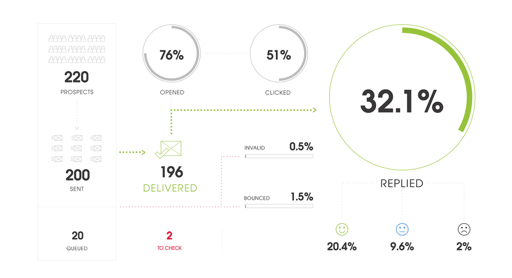
Track replies and engagement
Manage team outreach
It integrates with major email providers like Gmail and Outlook, making it easy to start.
Who Is Woodpecker Designed For?
B2B sales professionals
Lead generation agencies
SaaS founders
Freelancers doing outreach
Recruitment agencies
If cold email is part of your growth strategy, Woodpecker is built for you.
Key Features of Woodpecker
Let’s break down the features that actually matter.
Automated Email Sequences
Instead of sending emails one by one, you can build sequences. First email, follow-up after 3 days, another follow-up after 5 days… all automated.
It’s like setting up dominoes. Once pushed, they fall perfectly in place.
Response time is generally reliable, especially for paid users.
Real Use Cases
B2B Sales Teams
Outbound prospecting becomes structured and scalable.
Agencies
Manage multiple client campaigns without chaos.
SaaS Startups
Generate demo bookings consistently.
Is Woodpecker Safe and GDPR Compliant?
Yes, Woodpecker follows GDPR standards and data protection policies.
However, compliance also depends on how you collect and use email data.
Who Should Use Woodpecker?
Serious outbound sales teams
Agencies managing clients
Businesses focusing on quality over volume
Who Should Avoid It?
People wanting unlimited bulk sending
Those seeking free forever tools
Users needing heavy AI email writing
Final Verdict – Is It the Best Cold Email Tool?
Is it perfect? No tool is.
But if your priority is:
Deliverability
Professional outreach
Smart automation
Reliable follow-ups
Woodpecker is definitely among the top contenders.
It’s built for sustainable outreach—not spam blasts.
And that’s a big difference.
Conclusion
Cold email remains one of the highest ROI marketing channels—if done right.
Woodpecker makes that process scalable, organized, and safer. While it may not be the cheapest tool on the market, it balances automation with deliverability extremely well.
If you’re serious about outbound sales and want consistency over shortcuts, Woodpecker is a solid investment.
Now the real question is: Are you ready to send smarter emails—or keep guessing?
Frequently Asked Question
Is Woodpecker good for beginners?
Yes, the interface is user-friendly, though understanding cold email strategy helps.
Does Woodpecker improve email deliverability?
Yes, it includes sending limits and warm-up practices that protect sender reputation.
Can I use Woodpecker with Gmail?
Absolutely. It integrates directly with Gmail and Outlook accounts.
Is Woodpecker better than Lemlist?
It depends. Woodpecker focuses more on deliverability and automation, while Lemlist emphasizes creative personalization.
Is Woodpecker worth the price?
If outbound sales drives your revenue, the ROI can easily justify the cost.